
Private local chat
Stream conversations with local models via Ollama. Workspaces with their own system prompt and default model, auto-titled conversations, full history on your disk, export to Markdown or JSON.
Chat with local AI models, ask questions about your documents with cited sources, and let a safe code agent work on your projects. VaiChat keeps everything on your Mac and iPhone — no account, no cloud, no data collection.
Free & open. Works with Ollama, LM Studio, OmniRoute and any OpenAI-compatible server.
Models run on your device. Chats, documents and code never leave your machine.
No account, no API bill, no monthly fee. Bring your own local models — or optionally connect a cloud provider.
Once a model is downloaded, chat, document Q&A and the code agent all work without internet.
One app for private chat, document intelligence and coding — built around local models.
Stream conversations with local models via Ollama. Workspaces with their own system prompt and default model, auto-titled conversations, full history on your disk, export to Markdown or JSON.
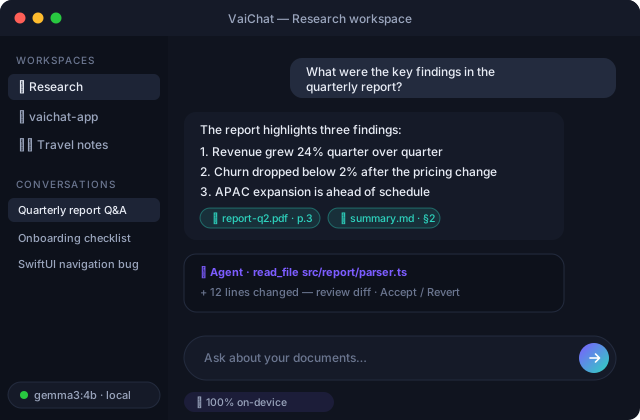
Drop in TXT, Markdown or PDF files. VaiChat chunks, embeds and indexes them locally, then answers your questions with citations pointing back to the exact source passages.
Point it at a project and ask about the codebase. In agent mode it can edit files and run commands — every edit ends in a diff you accept or revert, and every command needs your explicit approval.
Browse the ollama.com library, pull models with live progress, see capability badges (chat, tools, vision, thinking, embedding), context length and size, and test latency in one click.
Add any OpenAI-compatible endpoint — LM Studio, vLLM, OmniRoute or a cloud API. All models show up in one picker and VaiChat routes each chat to the right provider.
The agent detects your Xcode workspace, lists schemes, builds and tests with xcodebuild, and turns raw build output into structured, clickable diagnostics with a pass/fail summary.
The full workspace: chat, document RAG with citations, the permission-controlled code agent and the Model Center.
The same private AI on iPhone and iPad — on-device models, or your Mac's models over your local network.
Get Ollama from ollama.com — the free, open-source local model runtime VaiChat builds on.
Install VaiChat on your Mac, open the Model Center and pull a model — a 4B model runs comfortably on Apple Silicon.
Create a workspace, drop in documents or open a code project, and start asking. Everything stays on your device.
Yes. VaiChat is local-first: models run on your device through Ollama (or another local server), and chats, documents and embeddings are stored in a local SQLite database. Nothing is uploaded and there is no telemetry. Only if you deliberately configure a cloud provider does that traffic leave your machine.
Only to download models. After that, chat, document Q&A and the code agent all run fully offline.
Any model in the Ollama library — Llama, Gemma, Qwen, Mistral, DeepSeek and more. You can also connect LM Studio, vLLM, OmniRoute or any OpenAI-compatible API, and mix local and cloud models in one picker.
It is designed around permissions. Reading is sandboxed to the project folder; file edits are only possible in agent mode and always end in a unified diff you accept or revert; every shell command requires your explicit approval, and destructive commands are hard-blocked.
VaiChat is free. There is no account, no subscription and no usage metering — local models cost nothing to run.
A Mac with Apple Silicon is recommended for macOS (8 GB RAM runs small models well; 16 GB+ is comfortable for larger ones). The iOS app runs on-device models on recent iPhones and iPads, and can also use your Mac's models over Wi-Fi.
Private, local and free. Download VaiChat and run your own AI in minutes.